Shop
Showing 3–4 of 6 results
-
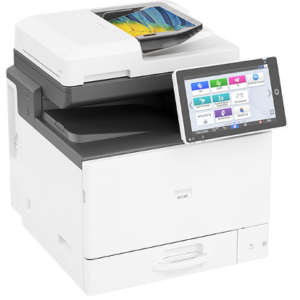
Ricoh IM C300
Read moreRicoh IM C300 Multifunction Printer
In a nutshell, for the money and size the IM C300 is a powerhouse of a multi function printer. It may look like the baby of the Kopikat family but it’s 10.1″ Ricoh Android Smart Touch Panel runs on the same engine as the IM C3010 and their bigger brothers. This Multifunction Printer is the most advanced A4 multi-function printer on the market anywhere in the world.
A Multifunction Printer for a small workload
The IM C300 is an ideal unit for between 3 and 5 users with a small workload (2000 – 3000 impressions per month), the IM C300 punches way above its weight. They offer users great value for money, and the same Smart Operation Panel and android user interface found on our most popular A3 devices. With the ability to connect to cloud-based solutions and integrate with existing software investments, these units will make a big impression. Plus, with eco-friendly features and security options, users can uphold their commitment to the environment and ensure their data and document integrity stay protected.
- 30 pages per minute
- Full color (LTR) & Black & White
- 5 Years Warranty
- 3-5 Years Optional Lease-Purchase
Multifunction Printer Functionalities
The Automatic Duplex Document Feeder (ARDF), is a convoluted way of saying that it can automatically scan double sided pages (at a rate of 50ppm!) With the onset of GDPR and other regulations regarding data protection, this A4 powerhouse’s ability to scan to folder, email and cloud brings just the kind of future proofing that is needed for your business
Ricoh IM C300 Paper Capacity
While the machine’s paper capacity already sits at 250 pages, extra drawers can be added to quadruple capacity. It will not take up floor space, be noisy or intrusive. The Ricoh IM C300 can sit on a desktop or use its own cabinet.
Multifunction Printer Software
The new Intuitive User Interface simplifies operation and Ricoh’s Smart Device Connector app improves mobility by enabling users to interact with the Multifunction Printer using their smart phones and tablets. The Multifunction Printer also support use of optional workflow solutions, such as Ricoh’s StreamLine NX, GlobalScan NX and Hotspot Enterprise.
Call us direct about the Ricoh IM C300
CALL US DIRECTLY
CLICK TO DOWNLOAD THE RICOH C300 BROCHURE
-
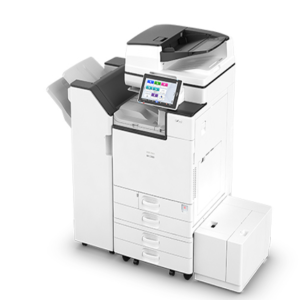
Ricoh IM C3010
Read moreRicoh IM C3010 in a nutshell
The Ricoh IM C3010 is known for Outstanding Reliability, Quality and workplace productivity. This is a 30 page per minute, high-end Multifunction Printer and by far our most popular unit. The large Android-Ricoh touch screen enables enhanced printing and scanning of documents while remaining easy to use. As with everything Kopikat, the quality and technology in the background allow us to keep it simple.
Why the Ricoh IM C3010 is for you
The greatest assets to a business are those which perform consistently all year round and the Ricoh IM C3010 is no different. Running quietly in the background, it comfortably handles all your office needs; printing and copying in colour, organizing document sets, scanning and distributing information and processing fax messages. If you would like a higher output than 30 pages per minute, you could opt for the IM C4510 (45 ppm) or IM C5500 (55 ppm).
Call us direct about the Ricoh IM C3010
- 30 ppm
- Full colour
- 3-5 optional lease purchase
Multifunction Printer Functionalities
IM C3010 features Ricoh’s new 10.1 inch Smart Operation Panel and is print, copy (30ppm) and scan enabled. Fax is an option. This model is supplied with an Automatic Reverse Document Feeder (ARDF) via which 100 originals can be fed in a single batch and scanned at a speed of 80 images per minute. Other functional options include PostScript and Kopikat Shareflow OCR scanning.
IM C3010 Printer Speed
The IM C3010 uses Ricoh’s GWNX controller, with its superfast 1.33GHz Intel processor to manage the workflow. To save time, a Human Detection Sensor wakes the MFP instantly from sleep mode – it takes less than 1 second – and the Smart Operation Panel lights up when touched, allowing the user to select applications and settings.
Ricoh’s Printer Software
The new Intuitive User Interface simplifies operation and Ricoh’s Smart Device Connector app improves mobility by enabling users to interact with the Multifuntion Printer using their smart phones and tablets. The Multifunctional Printer also support use of optional workflow solutions, such as Ricoh’s StreamLine NX, GlobalScan NX and HotSpot Enterprise.
CALL US DIRECTLY
CLICK TO DOWNLOAD THE RICOH C3010 BROCHURE